Every modality, one workflow.
Nano Banana 2 for images, Kling O3/V3 and Seedance 2.0 Omni for video, ElevenLabs v3 for narration, ElevenLabs Music for scores and SFX. The assistant picks the right model for the shot.
Codex + Claude plugin — v5.23.0
Thirteen skills that let Codex and Claude generate images, videos, voiceovers, and music on ProtaFilm|maker — with character consistency and post-production assembly built in.
v5.23.0 · 13 skills · MIT
v5.23.0 · 13 skills · MIT
Nano Banana 2 for images, Kling O3/V3 and Seedance 2.0 Omni for video, ElevenLabs v3 for narration, ElevenLabs Music for scores and SFX. The assistant picks the right model for the shot.
Persistent Kling Elements and Seedance Characters stored per project and reused across every generation. Self-contained prompt doctrine keeps multi-shot productions on-model.
Visual-first generation, continuous audio tracks, ffmpeg concat with Ken Burns presets, music ducking, and an editorial discipline pass before anything ships.
The Codex and Claude packages share the same 12 ProtaFilm|maker skills. Use the installer for the assistant you work in, then add the same ProtaFilm|maker personal access token.
Add the Codex marketplace repo, then install pr0ta.
Add the Claude marketplace or download the .plugin bundle directly.
In the ProtaFilm|maker web app, open Application Settings, then the API Keys tab (alongside General, Billing, and the other settings tabs). Create a personal access token there—it is only shown once. Use Application Settings → API Keys to jump straight in when you are signed in.
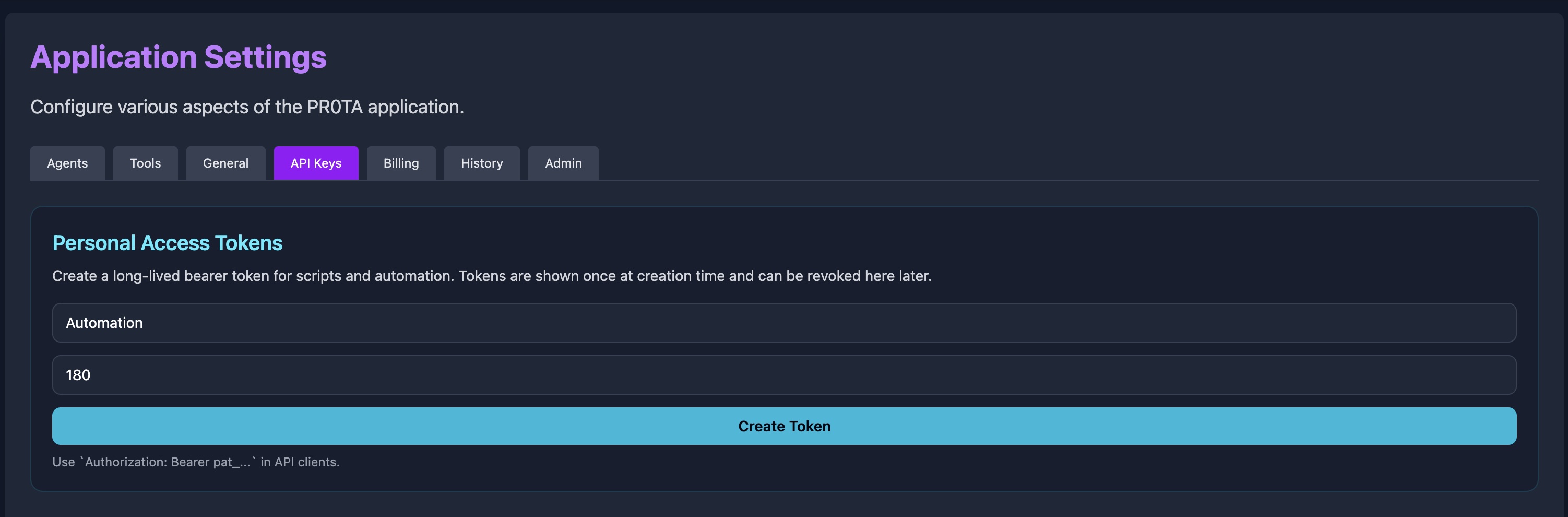
Authorization: Bearer pat_… in API clients and skills.Export it in your environment (example above), add it to your shell profile, or paste it for Codex or Claude at session start.
The Claude plugin calls a live API and runs local tools. Claude desktop ships locked down by default, so two capability settings need adjusting. Codex users can use the normal local Codex permissions flow.
Settings → Capabilities → Network access → All domains (allowlist). Restart Cowork mode.
Tighter allowlist: if you prefer to whitelist specific hosts, at minimum: api.pr0ta.com, app.pr0ta.com, storage.pr0ta.com, fal.media, cdn.pr0ta.com, api.elevenlabs.io, github.com, pypi.org.
Claude may install ffmpeg, ffprobe, jq, python3, and Python packages on first use. Don't pre-install anything — just let the sandbox run the installers when it prompts.
pip --break-system-packages for PythonHit "domain blocked" or "command not found"? It's almost always one of these two settings.
| Skill | What it does | When it loads | Size |
|---|---|---|---|
| pr0ta | Orchestration hub — workflow patterns, pipeline, project structure, `assets.json` schema | Any ProtaFilm|maker / creative production task | 200 |
| pr0ta-api | Unified `/generate` endpoint, auth, events, assets, Elements/Characters CRUD | Any ProtaFilm|maker API call | 800 |
| pr0ta-video | Kling O3/V3, Seedance 2.0 Omni, multi-prompt, camera control | Generating or editing video | 600 |
| pr0ta-image | Nano Banana 2, img_to_img, ref_to_img, edit_img, LoRA | Generating or editing images | 300 |
| pr0ta-audio | ElevenLabs v3 TTS, voice design, workspace controls | Generating voiceovers or dialogue | 350 |
| pr0ta-music | ElevenLabs Music, composition workspace, sound effects | Generating music or SFX | 300 |
| pr0ta-consistency | Kling Elements, Seedance Characters, reference pipeline | Multi-shot productions | 450 |
| pr0ta-prompting | Self-contained prompts, prompt bible, model-specific techniques | Writing any generation prompt | 500 |
| pr0ta-sync | Cue sheets, continuous audio, ffmpeg concat, music ducking | Multi-asset productions | 650 |
| pr0ta-editorial | Ruthless cutting, story-first pacing, quality bar, rewrite loop | Editing, reviewing, deciding to ship | 400 |
| pr0ta-timeline | ProtaFilm|maker Timeline browser editor — media pool, preview, shortcuts | Timeline-based editing | 400 |
| pr0ta-downloading | API download, gallery context menu, bulk export | Downloading or exporting assets | 250 |
| pr0ta-hybrid | Live-action plates + AI: Beeble SwitchX background swap/relight, mattes, world-anchored references | Working from footage, a scan, or a Marble world | 350 |
Every skill uses progressive disclosure — the SKILL.md stays focused and loads deeper reference files only when needed. The full pr0ta-api reference is ~800 lines in the main skill plus a reference/reliability-contract.md file that only loads when you're building the client wrapper.
The assistant reads the script, builds a cue sheet, generates shots with multi-prompt mode, scores to picture, and assembles with ffmpeg.
Sets up a Kling Element bundle, generates reference images, then drives all six video shots off the stored Element ID so Ada stays on-model.
ElevenLabs Music for the track, ffmpeg sidechain compression for the duck. Output is a mixed MP3 ready for upload.
Downloads existing assets via the API, builds a concat demuxer list, applies Ken Burns motion on stills, adds crossfades, mixes the music bed.
Detects the drift, uses ref_to_img to correct a key frame, re-runs the affected shot, re-assembles. Editorial pass before shipping.
Whisper transcription, editorial cut selection against the discipline checklist, Nano Banana for title cards (never `drawtext`), timeline assembly.
Once the plugin is installed and your token is set, you work in plain language with Codex or Claude. Getting reference stills into the right project and wiring them into generations is handled under the hood by the skills—you do not need to run API commands or copy HTTP examples from this page.
If you are extending or auditing the plugin itself, endpoints and payloads are documented in the pr0ta-api skill and the Codex GitHub repository.
After install, pull new builds from the same marketplace you used to install. Third-party marketplaces do not auto-update by default—run the two commands for your assistant when you want the latest skills. Optional: turn on auto-update under /plugin → Marketplaces.
Refreshes the pr0ta-codex marketplace, then installs the latest ProtaFilm|maker skills package.
Installs the latest pr0ta@pr0ta-tools bundle (all 13 skills). Start a fresh session if commands do not pick up immediately.
Releases follow semver; every release bumps version in plugin.json so Codex and Claude can detect that an update exists. Codex releases are on the Codex GitHub releases page; Claude bundle releases stay on the existing Claude repository.
Installed only from the .plugin bundle? Download the latest pr0ta.plugin from releases and reinstall it, or add the marketplace once and use the update commands above from then on.